Zendesk AI analysis that verifies your changes before they go live
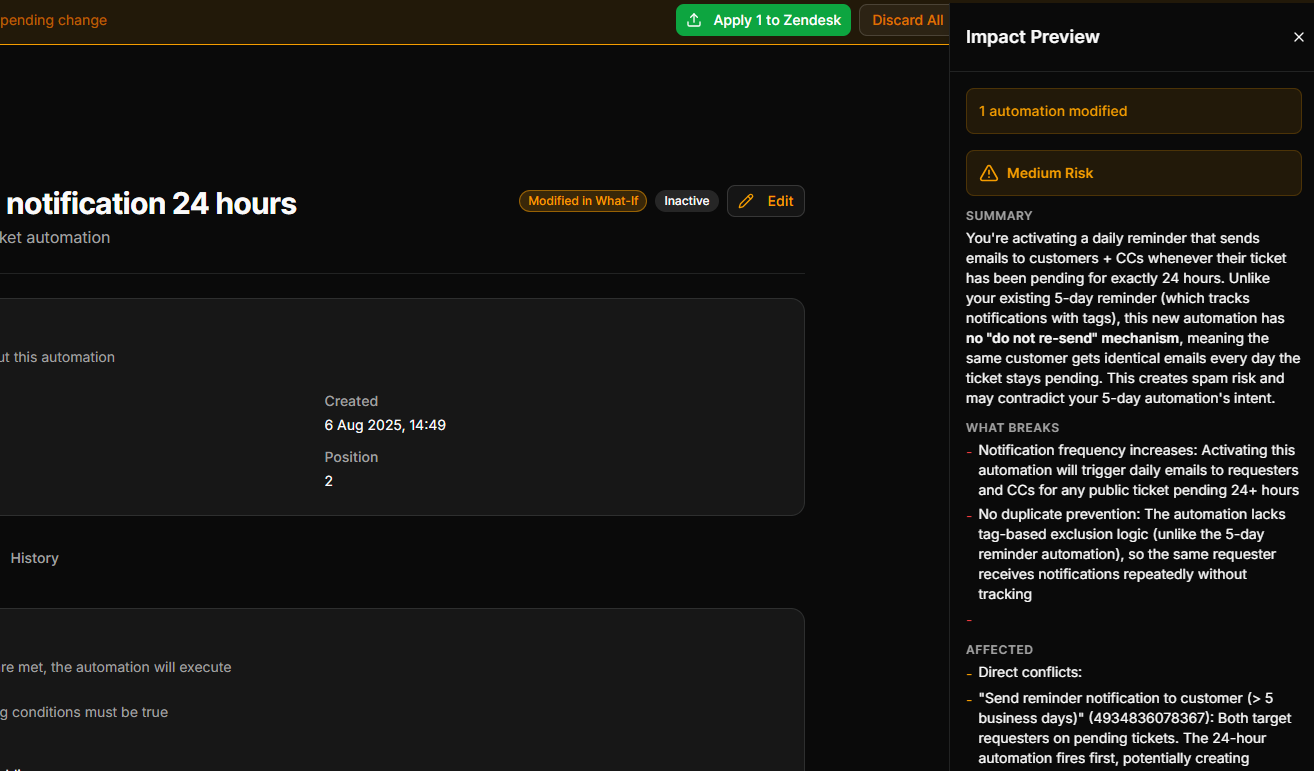
Before you apply a What-If change, Configly's Zendesk AI analysis reads the change together with the configuration it touches and tells you, in plain English, what will actually happen. See the real impact, then push with confidence.
The problem
You're about to apply a change to a trigger. A plain diff tells you "1 trigger changed." What it cannot tell you is whether that trigger was the only thing routing billing tickets to your finance team, and that without it those tickets will sit unassigned until a customer complains.
Understanding the real impact of a single change takes the contextual judgement of an experienced Zendesk admin: how this change interacts with the objects around it, and what breaks downstream. That judgement takes time you don't have when you're mid change.
Configly's AI verifies the change for you, in seconds, before it reaches your live instance.
How it works
Make a What-If change
Draft the change you want in What-If simulation. Nothing touches Zendesk yet.
The AI verifies it
Configly sends the proposed change and the configuration it depends on to the AI, which checks the real consequences: what this change affects, and what could break because of it.
Read the verdict, then apply
You get a plain-English assessment of what will happen and what to consider, before you decide to apply to Zendesk.
What the AI verification gives you
Plain-English impact of your change
No cryptic codes. The AI explains what your specific change will do, why it matters, and what to watch for, the way a senior colleague would.
Reads the change in context
Not just a before-and-after diff. The AI weighs the change against the triggers, automations, fields and SLAs it actually touches.
Catches risky changes early
Surfaces the downstream consequences of the edit you're making, so a routing or notification side effect is something you read about now, not after a customer does.
Built into What-If simulation
Verification runs as part of the simulation workflow. Make a virtual change, run the analysis, and get your result in seconds.
Smart caching
Results are cached per change set. Re-open the same simulation and your analysis is ready instantly, with a warning if the underlying config has moved on.
On all paid plans
AI verification is included on every paid plan (Solo, Multi-Instance and Agency). Trial users get a preview of the verification output; applying changes to Zendesk is a paid capability.
Looking for standing audits across your whole instance? Detecting routing gaps, SLA coverage, duplicate rules, notification issues and broken references (triggers pointing at deleted fields or empty groups) is deterministic auditing, not AI. That is what Health Checks does, on a schedule, with a scored report.
Ready to verify your next change with AI?
14-day free trial. No credit card required.
Start Free Trial