Push changes to Zendesk with confidence
Test your changes in What-If mode, review the impact, then apply to Zendesk with mandatory change reasons, automatic snapshots, and one-click rollback.
The problem
You've tested your change in Configly's What-If simulation. The AI says it's safe. Dependencies check out. Now you need to go back to Zendesk Admin Centre and manually recreate the same change — hoping you don't make a typo or miss a step.
Even worse, there's no audit trail. No record of why the change was made. No easy way to undo it if something goes wrong. Your change management process is a Slack message and a prayer.
Apply Changes closes the loop. Test in Configly, apply to Zendesk — with every safety net you'd want.
How it works
Test in What-If mode
Create virtual changes to your triggers, automations, macros, or any of the 40+ supported configuration types. Review the AI-powered impact analysis.
Provide a change reason
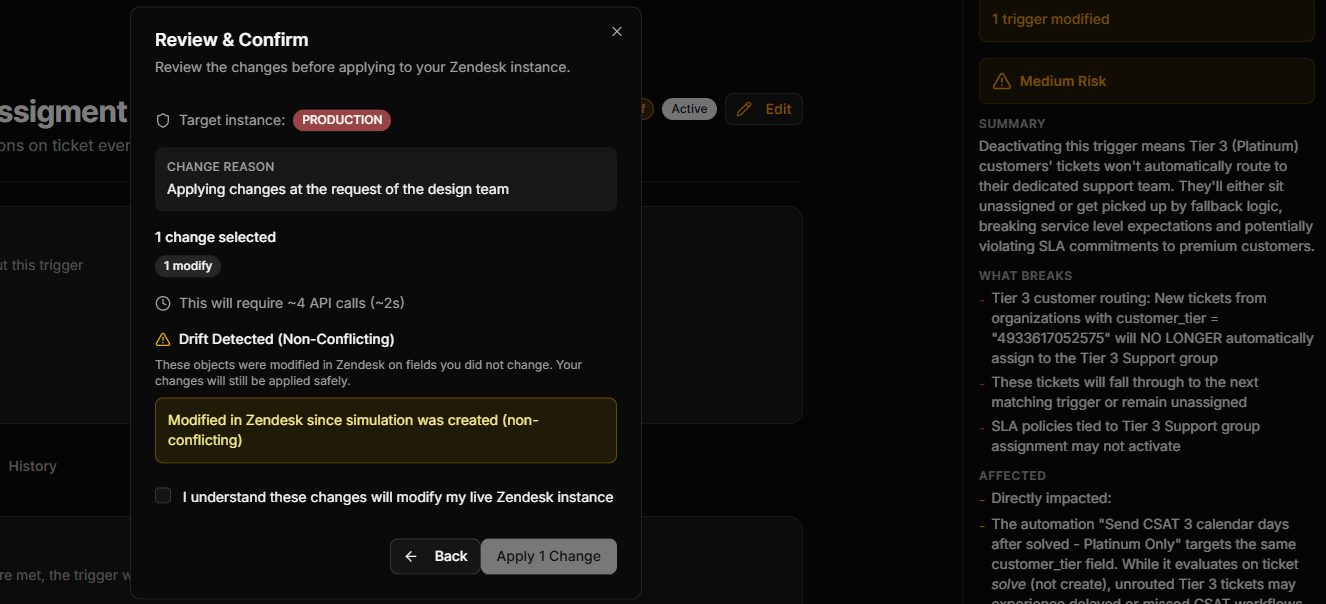
Every change requires a human-written reason — "Bob requested trigger update for escalation workflow." Your audit trail writes itself.
Apply with safety nets
Configly takes a snapshot before pushing, applies your changes to Zendesk, takes another snapshot after, and logs everything. One-click rollback if needed.
Key capabilities
Mandatory change reasons
Every change is tracked with a reason, so your team always knows who changed what and why. No more guessing what happened last Tuesday.
Automatic snapshots
Configly takes a snapshot before and after every change. If something goes wrong, roll back to the pre-change state with one click.
Drift detection
If someone changed your Zendesk config since your last sync, Configly warns you before pushing. No silent overwrites.
Selective apply
Choose exactly which changes to push. Apply some now, save others for later. Configly warns you if deselected changes create dependency gaps.
Apply history
Full audit log of every change ever pushed — who applied it, when, what changed, and the reason. Filterable, searchable, exportable.
One-click rollback
Every apply creates a snapshot you can roll back to. Select a previous state and push it back to Zendesk instantly.
Ready to close the loop?
14-day free trial. No credit card required.
Start Free Trial