Find configuration problems before your users do
Automated audits check your Zendesk configuration against practitioner best practices. Get a scored report with actionable findings and AI-powered remediation guidance.
The problem
Your Zendesk instance grows organically. Triggers get added, fields proliferate, automations overlap. After a year or two, nobody knows if the configuration is healthy or held together with duct tape.
You could audit it manually — but that means clicking through hundreds of triggers, tracing logic across automations, and checking every field reference. Most teams just don't have the time.
Configly's health checks encode years of Zendesk practitioner experience into automated rules. Run a check and know exactly where the problems are — with clear guidance on how to fix them.
How it works
Run a health check
Click "Run Health Check" or let Configly run checks automatically on a schedule. The engine audits your latest configuration snapshot against a library of best-practice rules.
Review your score
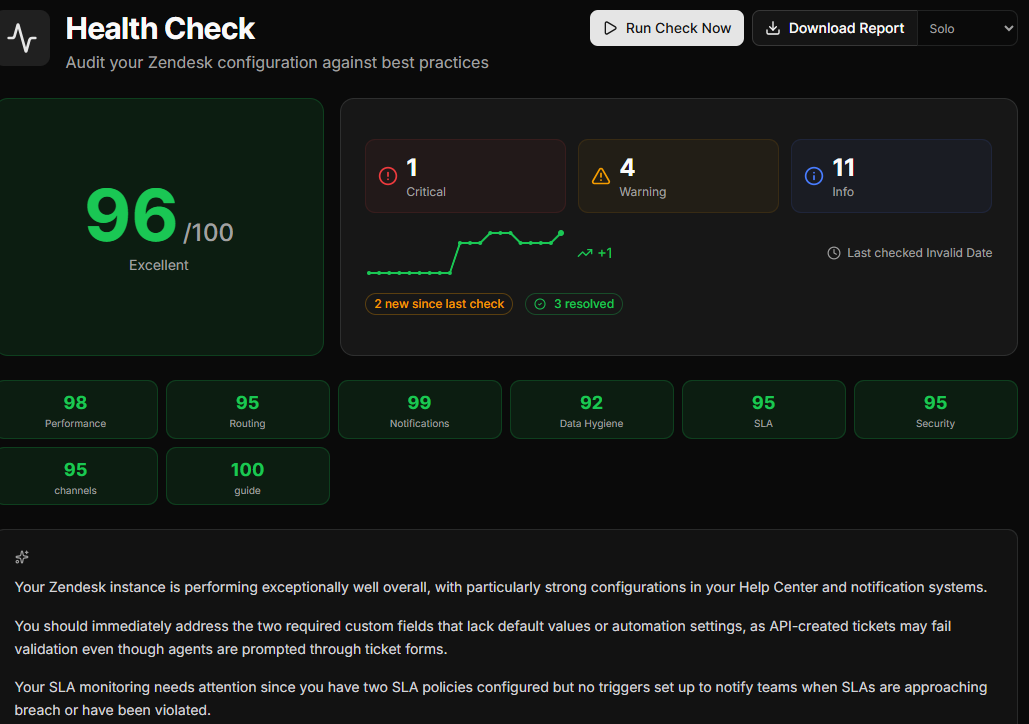
Get an overall health score (0–100), findings grouped by category and severity, and an AI-generated summary of what needs attention first.
Fix with guidance
Each finding includes severity, affected objects, and step-by-step remediation guidance. Click "Fix in What-If" to jump straight into simulation mode.
What gets checked
Performance & efficiency
Triggers with excessive conditions, duplicate rules, automations firing too frequently, inactive configurations that should be cleaned up.
Routing & assignment
Missing catch-all triggers, overlapping routes, circular assignments, SLA policies with no matching triggers, groups with no active agents.
Notifications
Duplicate notifications on the same event, notifications going to suspended users, missing requester updates on status changes.
Data hygiene
Unused custom fields, required fields with no automation populating them, duplicate field names, excessive dropdown options, and broken references such as triggers pointing at deleted fields or empty groups.
SLA compliance
Conflicting SLA policies, uncovered ticket categories, missing breach notifications, unrealistic targets given routing time.
Security & access
Macros that change ticket visibility, triggers sending internal data to external targets, views exposing restricted ticket types.
Report features
AI-powered summaries
A plain-English executive summary of your configuration health — perfect for sharing with leadership or stakeholders who don't speak Zendesk.
Trend tracking
Compare against previous health checks to see new issues, resolved issues, and your score over time. Know if things are getting better or worse.
Scheduled checks
Run health checks automatically — monthly on Solo, weekly on Multi-Instance, daily on Agency. Get notified when new issues appear.
Ready to audit your Zendesk?
14-day free trial. No credit card required.
Start Free Trial