Find anything in your Zendesk config instantly
One search box. Every trigger, automation, macro, view, and field. Results in milliseconds.
The problem
Finding a specific trigger in Zendesk means clicking into the Triggers page, scrolling through potentially hundreds of items, maybe using the basic filter. Need to check automations too? That's a separate page. Macros? Another page. Custom fields? You get the idea.
When you're troubleshooting an issue or auditing your instance, this click-and-scroll approach wastes enormous amounts of time. You know the thing exists — you just can't find it quickly.
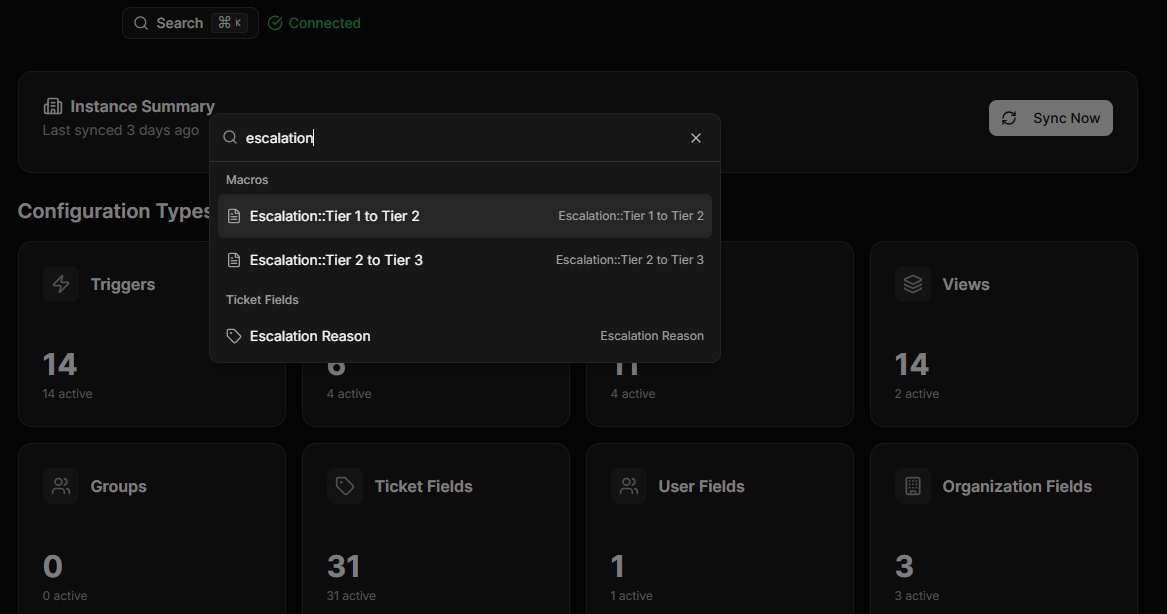
Configly's global search indexes everything in your instance and gives you results across all configuration types from a single search box.
How it works
Type your query
Enter any keyword, field name, or phrase into the global search bar.
Instant results
See matching items across all configuration types — triggers, automations, macros, views, and all field types — in real time.
Jump straight in
Click any result to see its full configuration detail, dependencies, and version history.
Key capabilities
Cross-type search
Search across 40+ configuration types — triggers, automations, macros, views, fields, SLAs, groups, brands, ticket forms, schedules, custom objects, routing, and more — in one query.
Real-time results
Results appear as you type — no waiting for page reloads.
Deep indexing
Searches names, descriptions, conditions, actions, and field values — not just titles.
Result grouping
Results organised by configuration type for easy scanning.
Direct navigation
Click any result to jump straight to the full detail view.
Search from anywhere
Accessible from the dashboard, any list view, or the global navigation.
Ready to stop hunting through Zendesk?
14-day free trial. No credit card required.
Start Free Trial